Reflected on a Discovery Feature Redesign from 2 years agoRepensé la refonte d’une fonctionnalité de découverte, avec 2 ans de recul

Queue is a movie and series tracking app that has a unique swipe feature, used to quickly sort what movie/series you have seen or want to see. In 2024 when I redesigned this feature, it had a lot of UX issues, and as a recurring user, I redesigned the feature to fix them. In 2026, I am reflecting on it through this case study.Queue est une application de suivi de films et de séries dotée d’une fonctionnalité de swipe unique, permettant de trier rapidement les titres que l’on a vu ou qu’on souhaite voir. En 2024, quand j’ai redésigné cette fonctionnalité, elle avait de nombreux problèmes UX, et en tant qu’utilisatrice régulière, je l’ai redésignée pour les corriger. En 2026, je reviens sur mes choix à travers cette étude de cas.

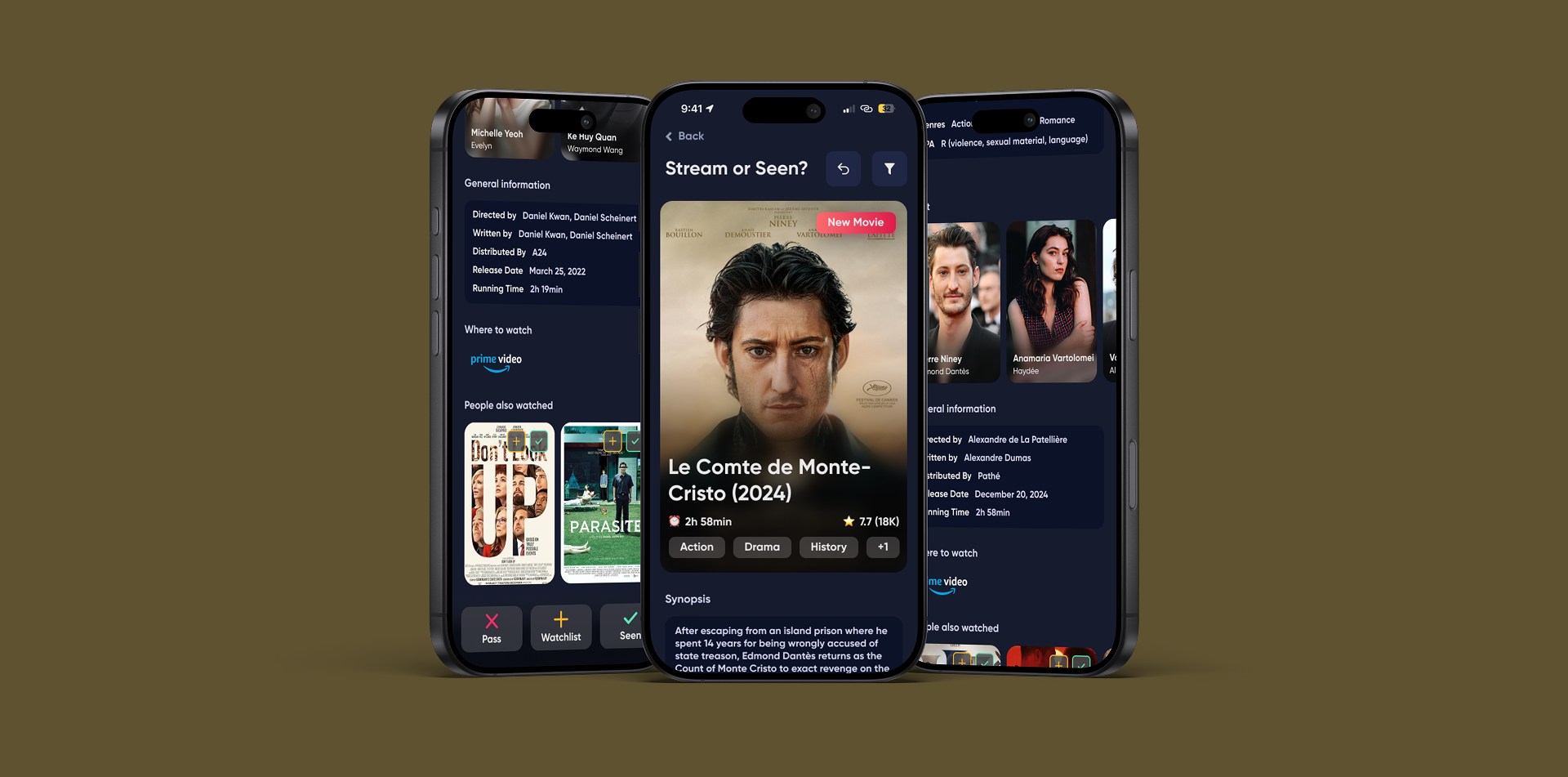
Three phone mockups of the redesigned feature: a movie card with its title, duration, rating and genres, followed by the synopsis, cast, general information, where to watch and similar titles, with Pass, Watchlist and Seen buttons at the bottomTrois maquettes de téléphone de la fonctionnalité redésignée : une carte de film avec son titre, sa durée, sa note et ses genres, suivie du synopsis, du casting, des informations générales, des plateformes de diffusion et de titres similaires, avec les boutons Pass, Watchlist et Vu en bas
MY ROLEMON RÔLE
UX/UI DesignUX/UI design
UX ResearchRecherche UX
TIMELINEDURÉE
2 months2 mois
KEY WORDSMOTS-CLÉS
RedesignRefonte
Mobile AppApplication mobile
Competitive AnalysisAnalyse concurrentielle
RetrospectiveRétrospective
TOOLS USEDOUTILS UTILISÉS
Figma

Decision-making based mainly on the title posterUne décision basée surtout sur l’affiche

This feature, the Add to My Library feature, forced users to make a decision based mainly on the title poster. There was no access to details such as synopsis, cast, or rating. This lack of information can prevent the user from discovering titles that match their taste, because they can not know what to expect from a movie with only a poster.

La fonctionnalité « Ajouter à ma bibliothèque » forçait les utilisateurs à décider surtout à partir de l’affiche du titre. Aucun accès au synopsis, au casting ou à la note. Ce manque d’information pouvait empêcher l’utilisateur de découvrir des titres correspondant à ses goûts, faute de savoir à quoi s’attendre avec seulement une affiche.
Too many steps in the featureTrop d’étapes dans la fonctionnalité

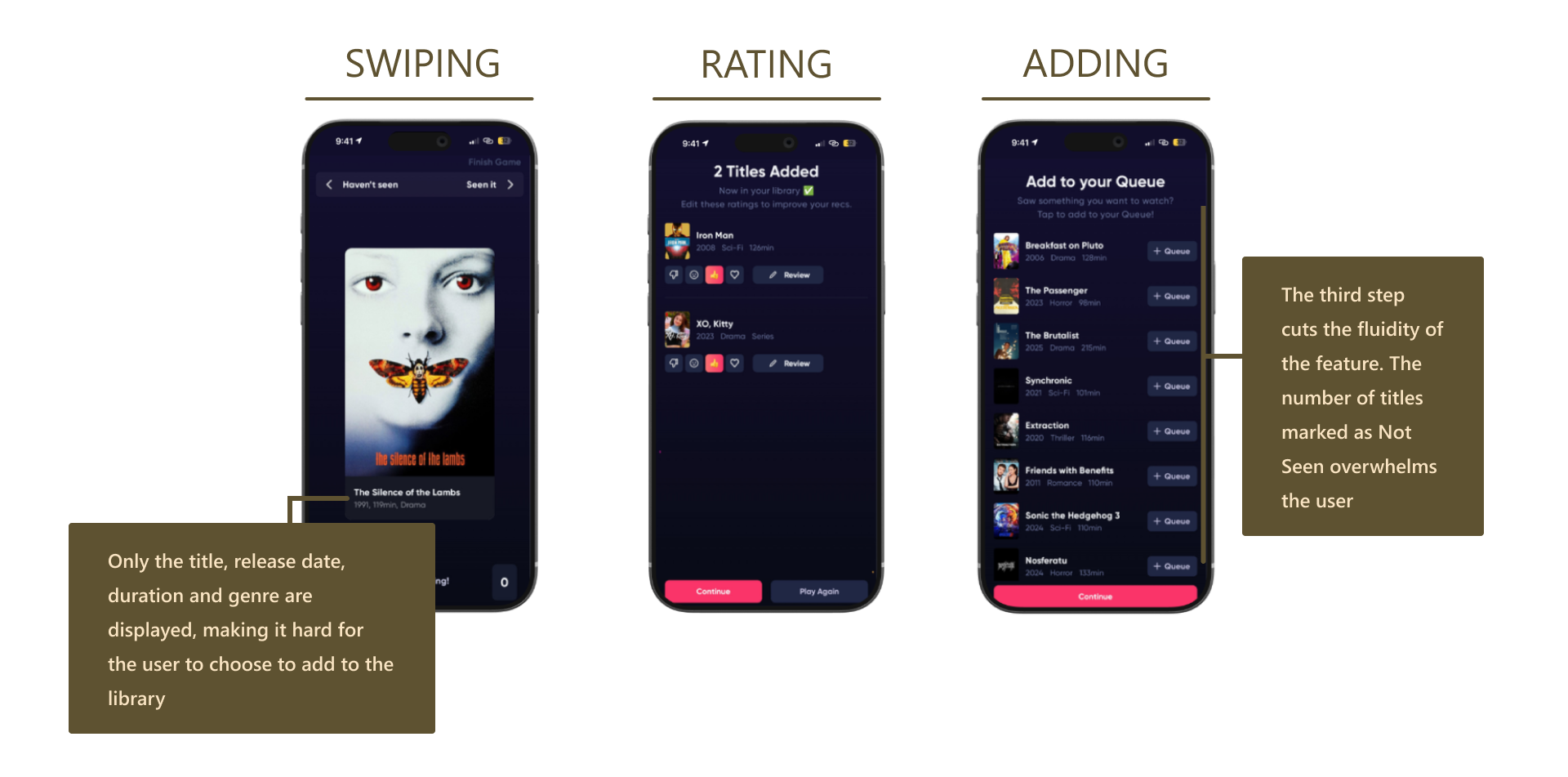
This feature worked in three steps: First, the user swipes left or right on the card to indicate whether they have already watched a title or not. Then, the user can rate the titles they marked as Seen. Finally, they receive the list of titles marked as unwatched and can add them to their watchlist. Each step has a clear purpose, but step 2 and 3 can feel very overwhelming depending on how many titles you have swiped.

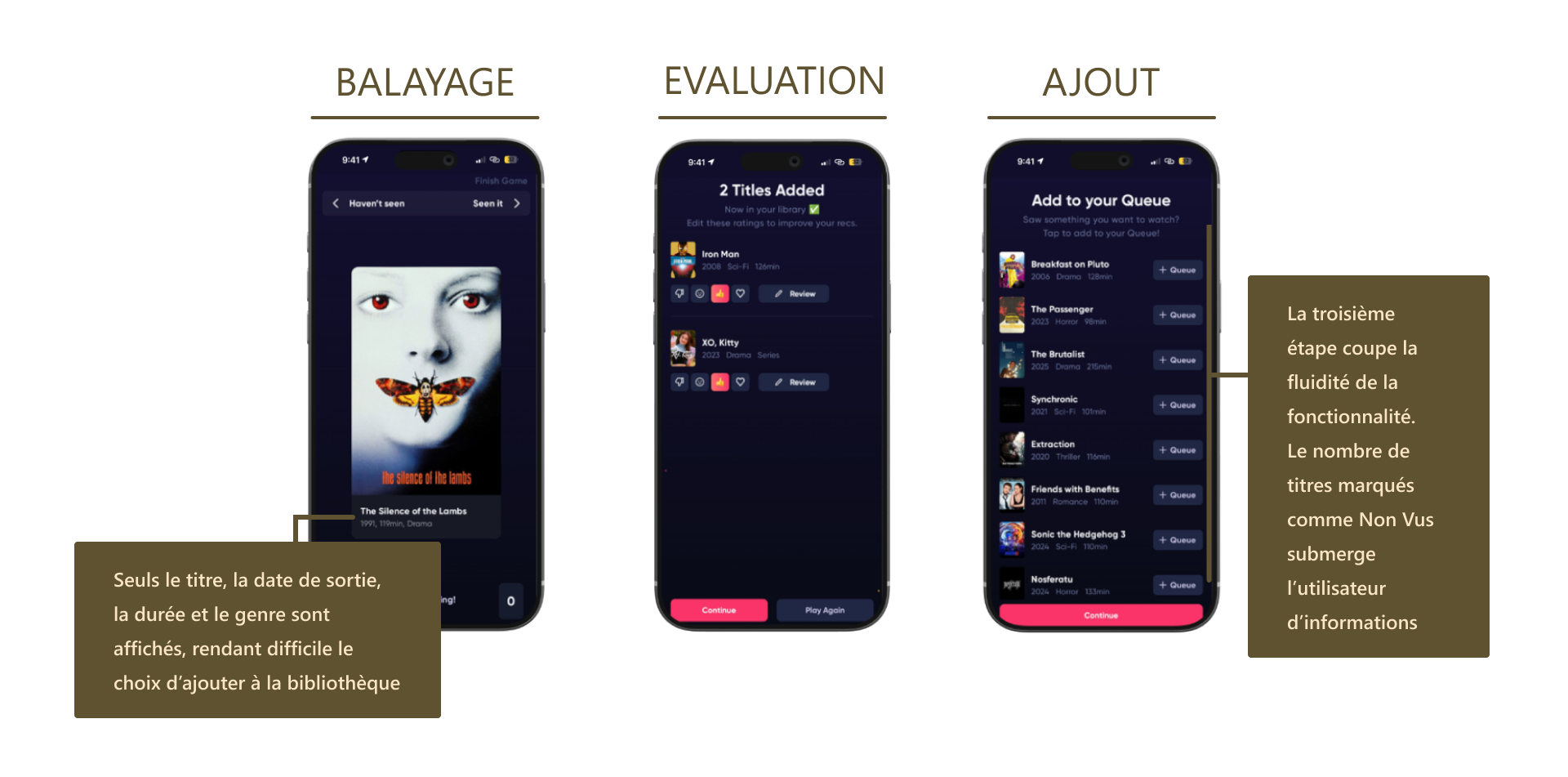
Cette fonctionnalité fonctionnait en trois étapes : d’abord, l’utilisateur swipe à gauche ou à droite pour indiquer s’il a déjà vu un titre. Ensuite, il peut donner une note aux titres marqués comme « Vus ». Enfin, il reçoit la liste des titres marqués comme non vus et peut les ajouter à sa watchlist. Chaque étape a un objectif clair, mais les étapes 2 et 3 peuvent devenir très lourdes selon le nombre de titres swipés.

This was my first redesign!C’était ma toute première refonte !

As a junior UX/UI designer doing her first redesign, I felt overwhelmed by the amount of possibilities I had while redesigning. I was too perfectionist and took an eternity making different versions of the feature and not knowing what was best.

En tant que designer UX/UI junior faisant sa première refonte, je me suis sentie dépassée par le nombre de possibilités. J’étais trop perfectionniste et j’ai passé un temps fou à créer différentes versions de la fonctionnalité sans savoir laquelle était la meilleure.

The three steps of the original feature: swiping, rating and adding. On the swiping screen, only the title, release date, duration and genre are displayed, making it hard for the user to choose to add to the library. The third step cuts the fluidity of the feature: the number of titles marked as Not Seen overwhelms the user.Les trois étapes de la fonctionnalité d’origine : balayage, évaluation et ajout. Sur l’écran de balayage, seuls le titre, la date de sortie, la durée et le genre sont affichés, rendant difficile le choix d’ajouter à la bibliothèque. La troisième étape coupe la fluidité de la fonctionnalité : le nombre de titres marqués comme Non Vus submerge l’utilisateur d’informations.

Improved decision-making with content informationDes décisions plus informées grâce au contenu

To help users making more informed choices, I implemented a scrolling section on each title with the synopsis, cast, rating, genre, as well as keywords. That way, the only information missing is the trailer, that could be added in a second iteration.

Pour aider les utilisateurs à faire des choix plus éclairés, j’ai ajouté une section défilante sur chaque titre avec synopsis, casting, note, genre et mots-clés. Il ne manquait alors plus que la bande-annonce, envisageable dans une seconde itération.

Enhanced discovery with filters and recommendationsDécouverte améliorée grâce aux filtres et recommandations

I also made it easier for people to discover content that interest them, with filters within the feature to help them narrow down titles by streaming platform, genre, or other preferences. The scrolling section also features a Similar Content section where users can discover... similar content.

J’ai aussi facilité la découverte de contenus pertinents, avec des filtres pour affiner par plateforme de streaming, genre ou autres préférences. La section défilante propose aussi une section « Contenus similaires » où l’on peut découvrir... du contenu similaire au titre présenté.

Improved the flow with action buttonsParcours simplifié grâce à des boutons d’action

To improve breach errors were experiencing because of the three steps, I turn them into only one step. I integrated fixed buttons at the bottom of the screen for quick access to Pass, Watchlist and Seen option, eliminating the third step. I also added swipe animations, and an undo button. This simplified the feature for people that are just looking to fill their library or find inspiration on what to watch.

Pour réduire les erreurs liées aux trois étapes, je les ai regroupées en une seule. J’ai intégré des boutons fixes en bas de l’écran pour un accès rapide à Pass, Watchlist et Vu. J’ai aussi ajouté des animations de swipe et un bouton annuler. Cela simplifie la fonctionnalité pour ceux qui veulent simplement remplir leur bibliothèque ou trouver l’inspiration.

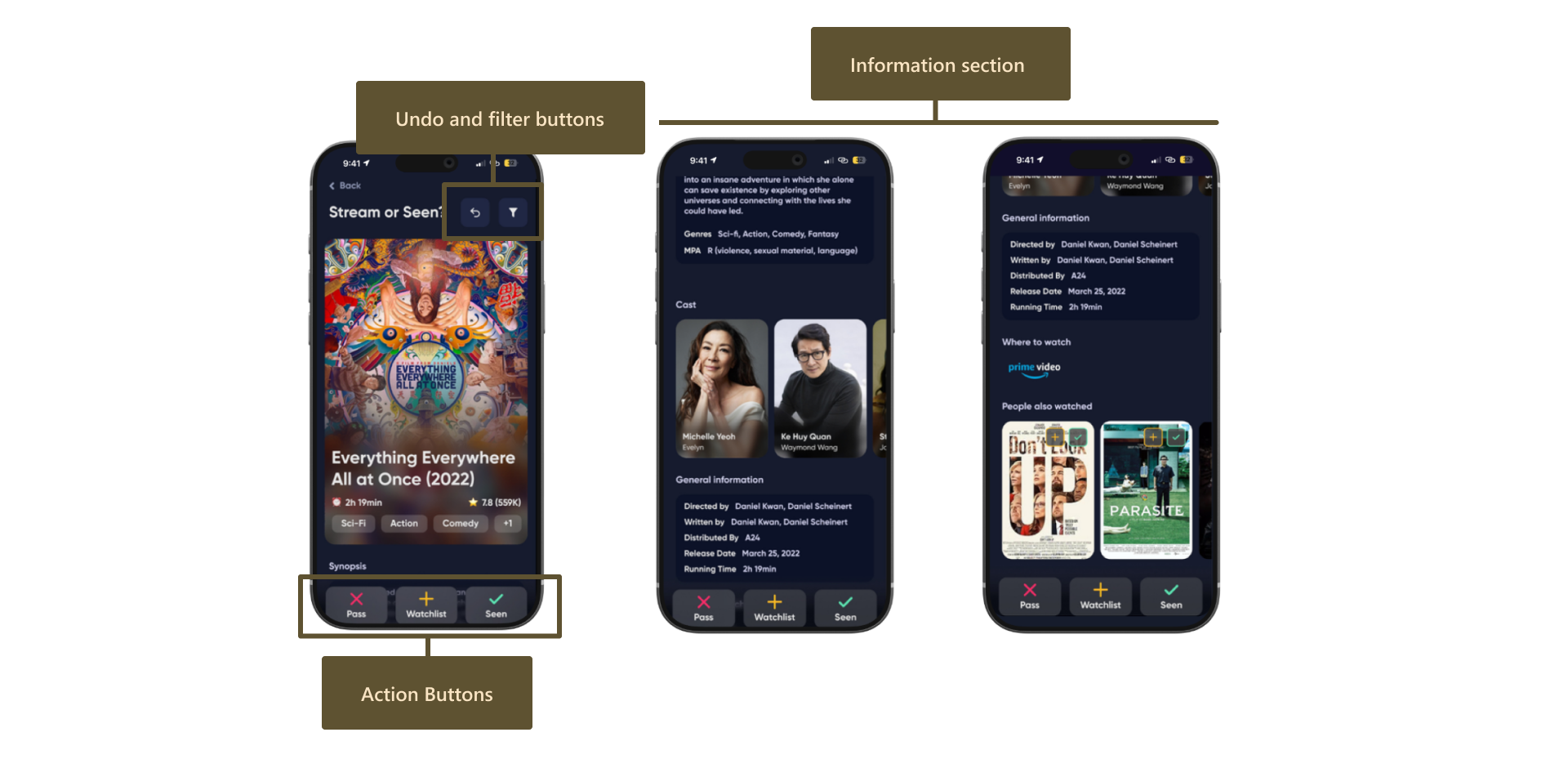
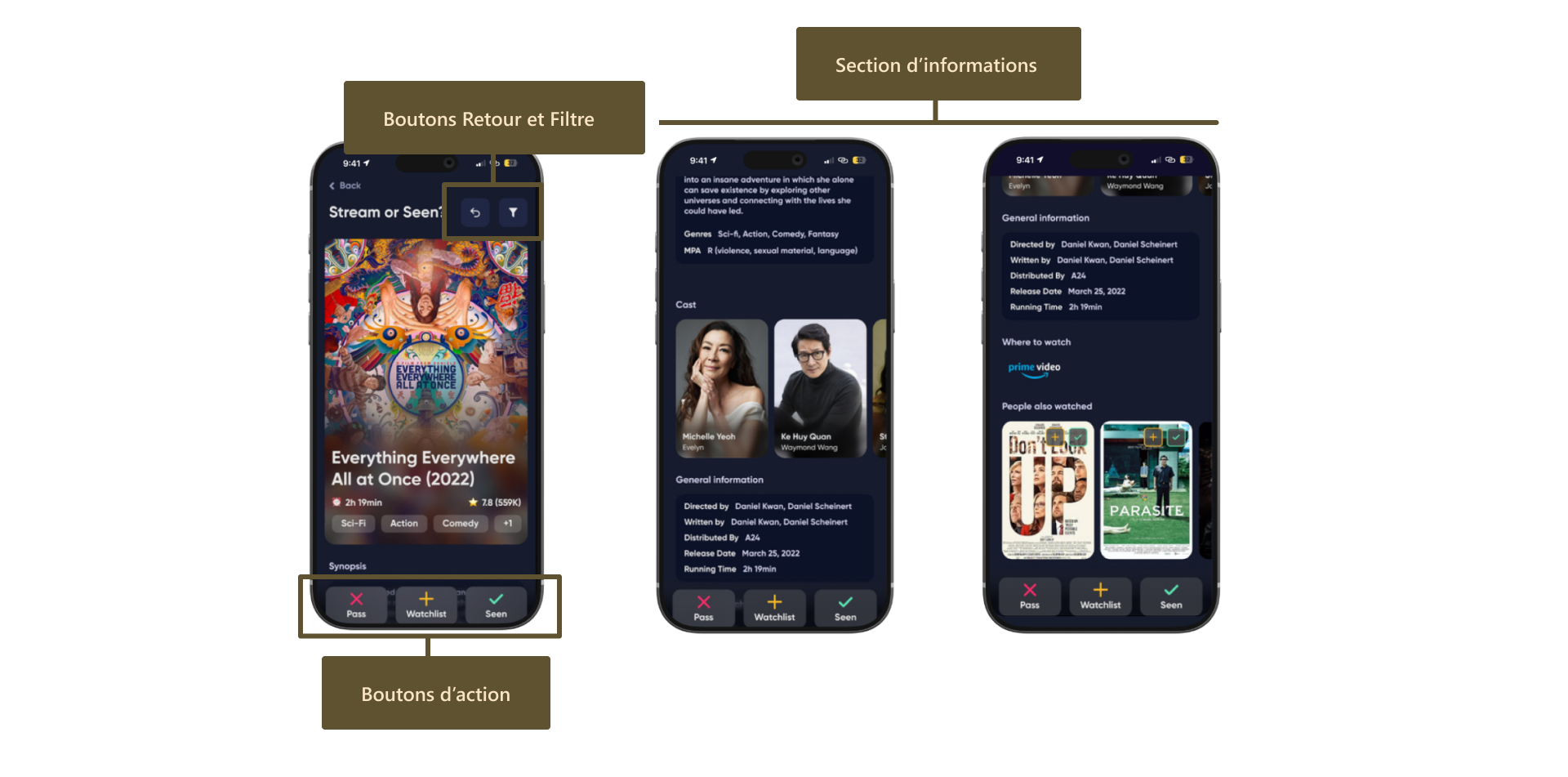
Three phone screens of the redesigned feature. The first shows the movie card with undo and filter buttons at the top and Pass, Watchlist and Seen action buttons at the bottom. The other two show the information section: synopsis, genres, cast, general information, where to watch and similar titles.Trois écrans de la fonctionnalité redésignée. Le premier montre la carte du film avec les boutons Retour et Filtre en haut et les boutons d’action Pass, Watchlist et Vu en bas. Les deux autres montrent la section d’informations : synopsis, genres, casting, informations générales, plateformes de diffusion et titres similaires.

Comparative analysis of apps with swipe featuresAnalyse comparative d’apps à fonctionnalité swipe

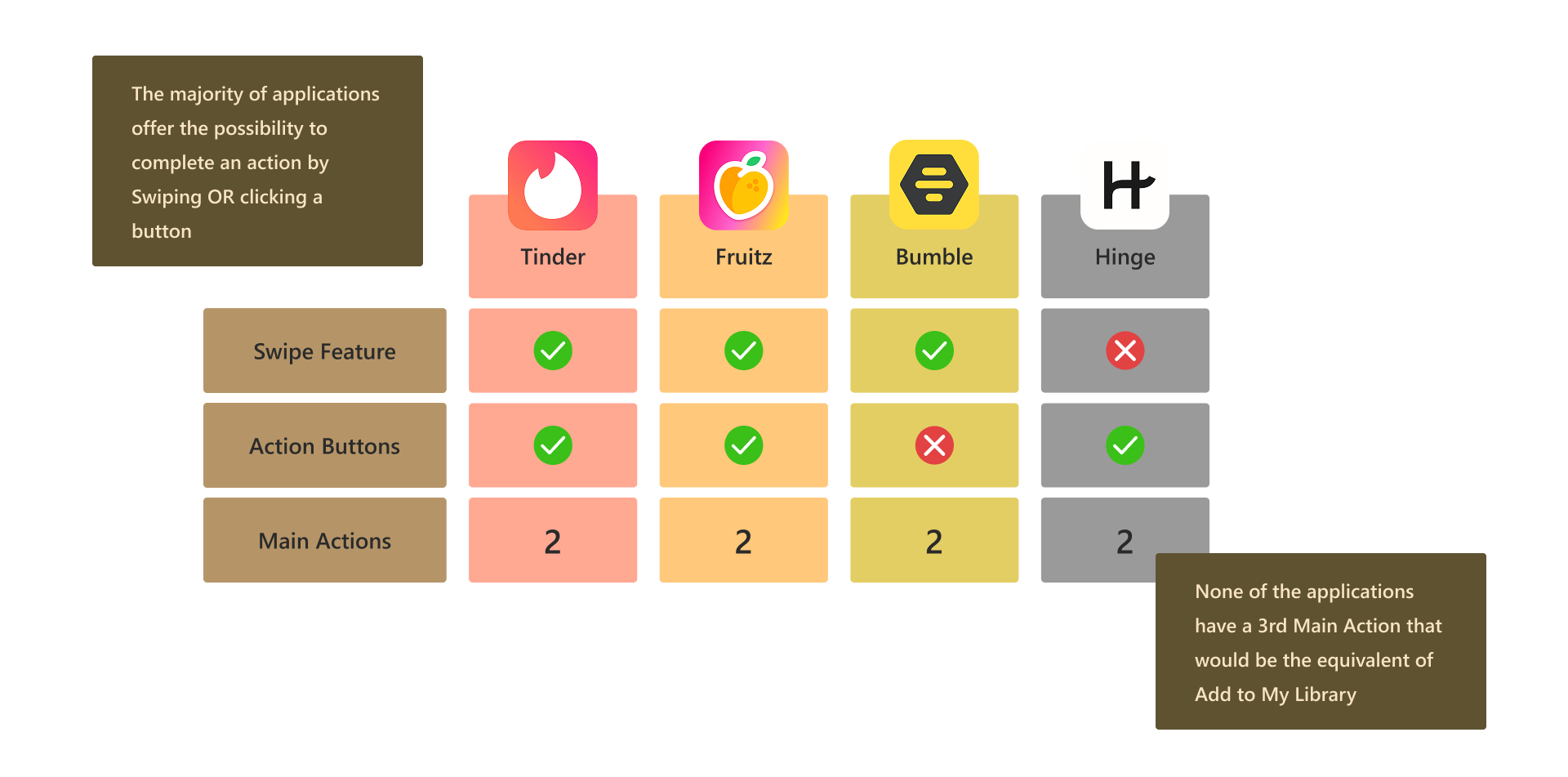
To begin my research, I applied Jakob's law expressing that users prefer your product to function similarly to other sites they are familiar with. Famous applications with swipe features are dating apps, like Tinder, Fruitz, Bumble and Hinge. This analysis revealed that most of them have the ability to swipe left/right to take action, the presence of action buttons as alternative to the swipe, but all these apps only had 2 main actions: Pass, or Like. In our feature, we have 3 main actions : pass, watched, and watchlist.

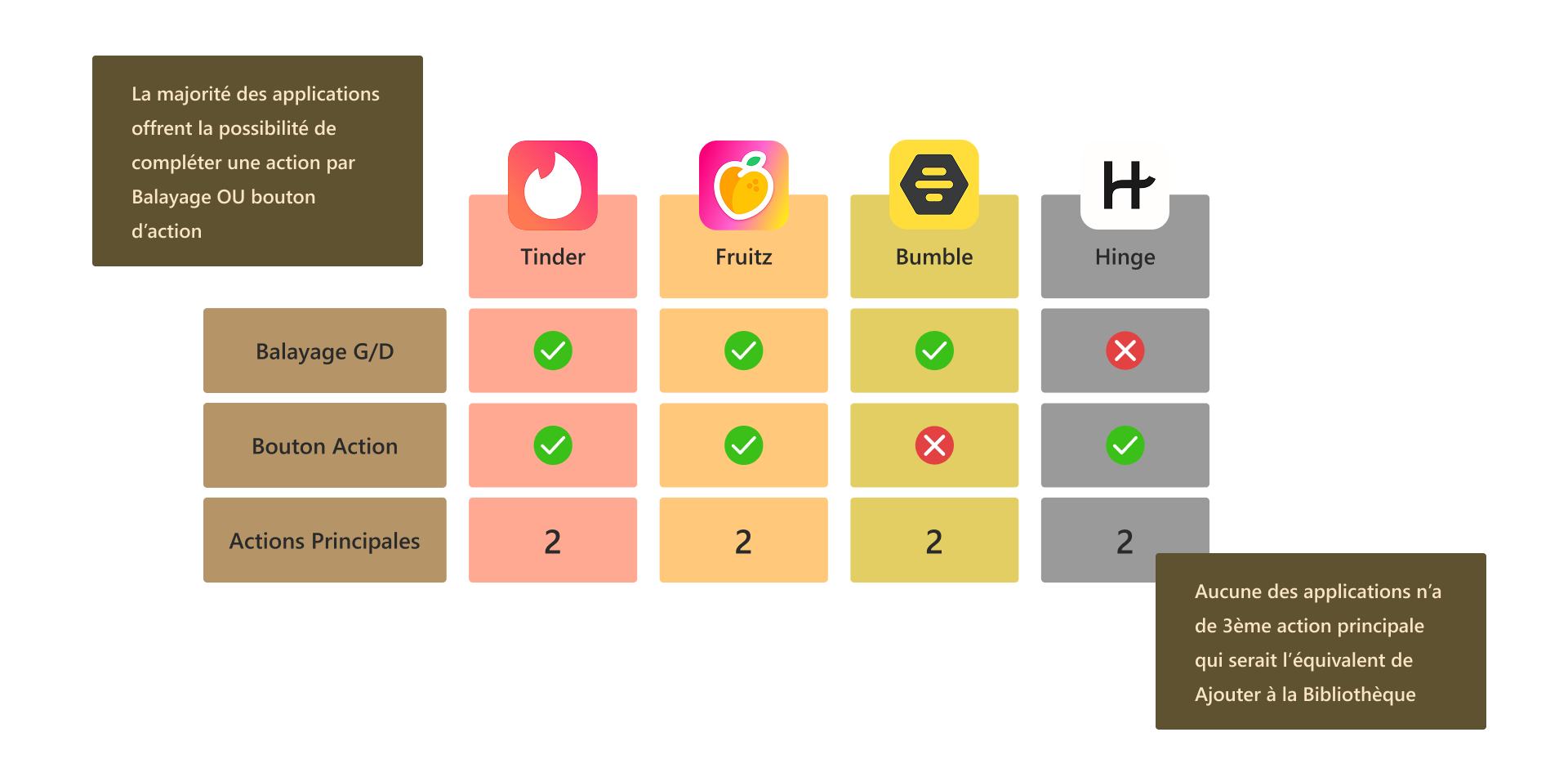
J’ai commencé en appliquant la loi de Jakob, qui veut que les utilisateurs préfèrent qu’un produit fonctionne comme les autres sites qu’ils connaissent. Les applications de rencontre (Tinder, Fruitz, Bumble, Hinge) sont les plus connues pour le swipe. Cette analyse a révélé que la plupart permettent de swiper à gauche/droite pour agir, avec des boutons d’action en alternative, mais toutes n’ont que 2 actions principales : Pass ou Like. Dans notre fonctionnalité, nous avons 3 actions principales : pass, vu, et watchlist.

Comparison table of Tinder, Fruitz, Bumble and Hinge. Tinder, Fruitz and Bumble have a swipe feature; Tinder, Fruitz and Hinge have action buttons; all four have 2 main actions. The majority of applications offer the possibility to complete an action by swiping or clicking a button, but none of them have a 3rd main action that would be the equivalent of Add to My Library.Tableau comparatif de Tinder, Fruitz, Bumble et Hinge. Tinder, Fruitz et Bumble proposent le balayage gauche/droite ; Tinder, Fruitz et Hinge ont des boutons d’action ; les quatre ont 2 actions principales. La majorité des applications permettent d’agir par balayage ou bouton d’action, mais aucune n’a de 3ème action principale équivalente à Ajouter à la Bibliothèque.

Competitor analysis of other movie tracking appsAnalyse concurrentielle d’autres apps de suivi

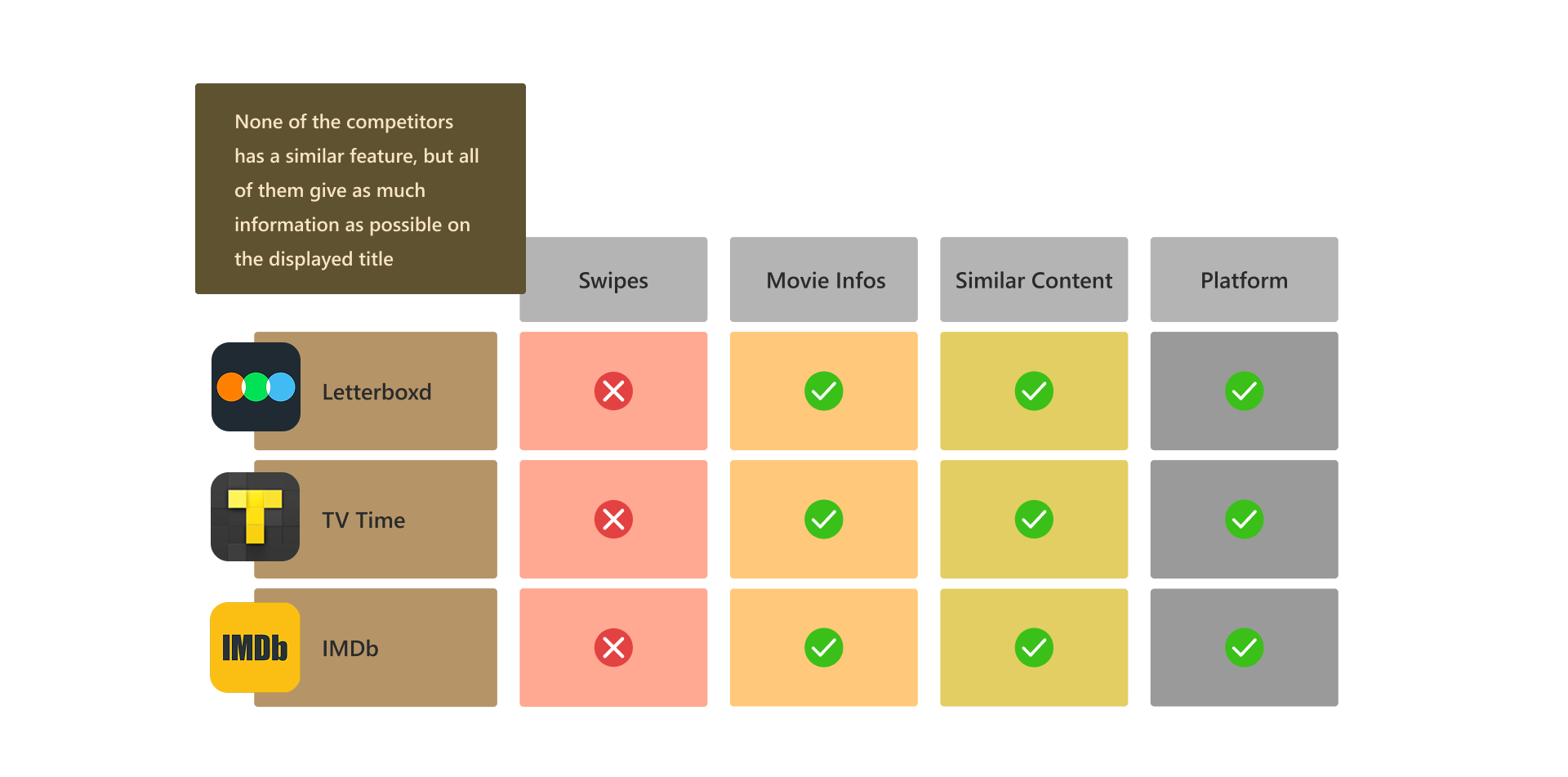
I also analyzed the content of three other apps (Letterboxd, TV Time and IMDb) to better understand the type of information users expect to get on a movie tracking app. The analysis revealed that all platforms show movie/series basic information, similar content and the platform you can find the content on. However, the swipe feature is proper to Queue!

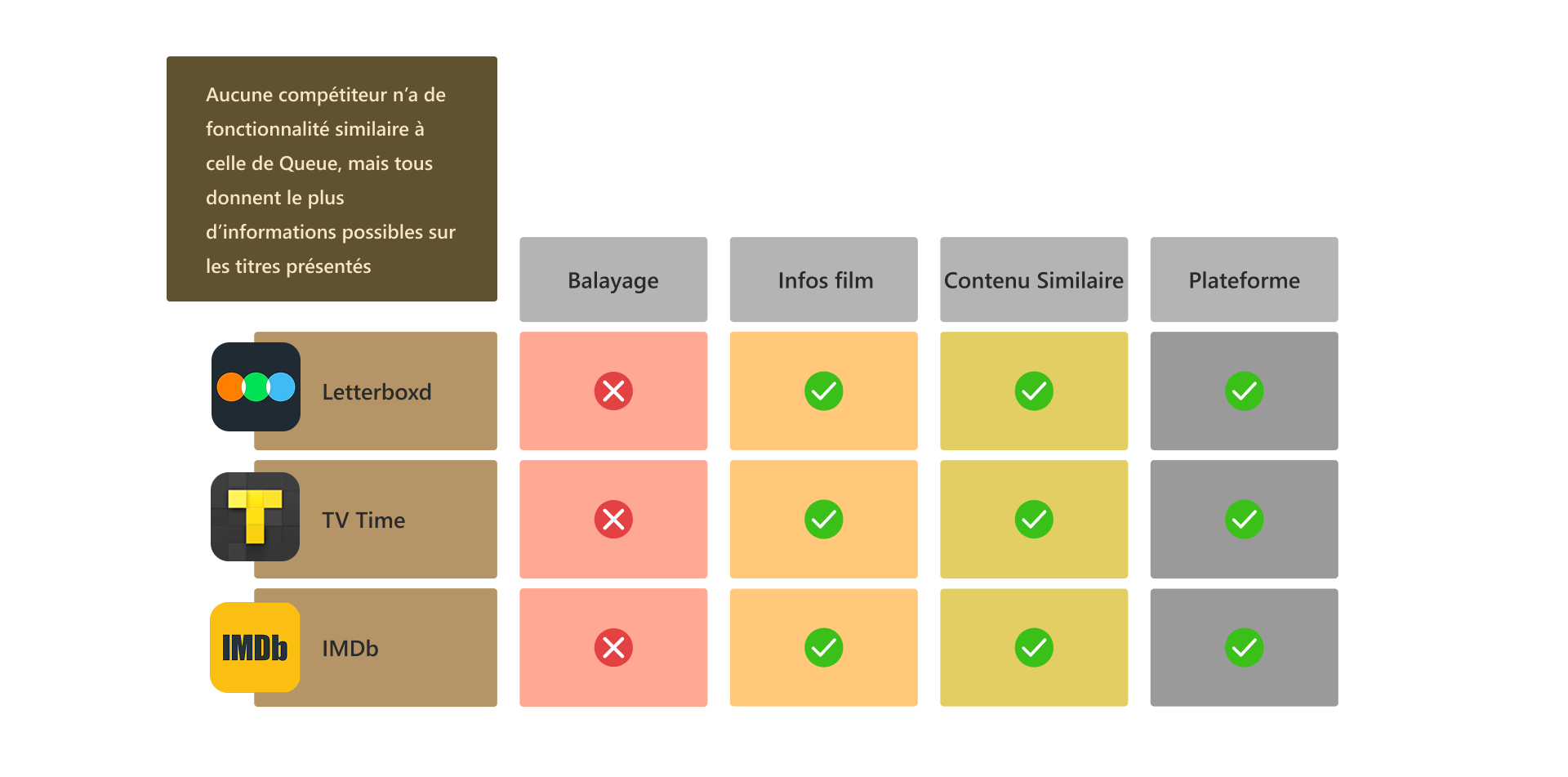
J’ai aussi analysé le contenu de trois autres apps (Letterboxd, TV Time et IMDb) pour mieux comprendre les informations attendues sur une application de suivi de films. Toutes les plateformes affichent les informations de base, du contenu similaire et la plateforme de diffusion. En revanche, la fonctionnalité de swipe est propre à Queue !

Comparison table of Letterboxd, TV Time and IMDb. None of them has swipes, but all three show movie information, similar content and the streaming platform. None of the competitors has a similar feature, but all of them give as much information as possible on the displayed title.Tableau comparatif de Letterboxd, TV Time et IMDb. Aucun ne propose le balayage, mais les trois affichent les infos du film, du contenu similaire et la plateforme. Aucun compétiteur n’a de fonctionnalité similaire à celle de Queue, mais tous donnent le plus d’informations possibles sur les titres présentés.

Questioned the implementation of some elementsRemise en question de certains éléments

Once everything was implemented as I wanted (or once I accepted it wouldn't be perfect...), I started questioning if the implementation of a trailer section would slow down the application, if the design I had made really had a place for the trailer, and concluded that I could add the trailer as a second slide of the card.

Une fois tout implémenté comme je le voulais (ou une fois accepté que ce ne serait pas parfait...), je me suis demandé si une section bande-annonce ralentirait l’application, si mon design lui laissait vraiment sa place, et j’ai conclu que je pouvais l’ajouter comme second volet de la carte. Aujourd’hui, je n’aurais pas mis la bande-annonce derrière le volet de la carte comme ça !

Doubted the 3 main actionsDoute sur les 3 actions principales

Three main actions felt like too much. I was not sure how to implement it properly on the feature, and ended up having an upward swipe to add to watchlist. One option I had thought of was to have Watchlist as the left swipe, Watched as the right swipe, and a Pass cross on the card. Now, I know that none of these option was best.

Trois actions principales me semblaient trop. Je ne savais pas comment bien les implémenter et j’ai fini avec un swipe vers le haut pour la watchlist. J’avais aussi envisagé watchlist à gauche, vu à droite, et une croix Pass sur la carte. Aujourd’hui, je sais qu’aucune de ces options n’était la meilleure.

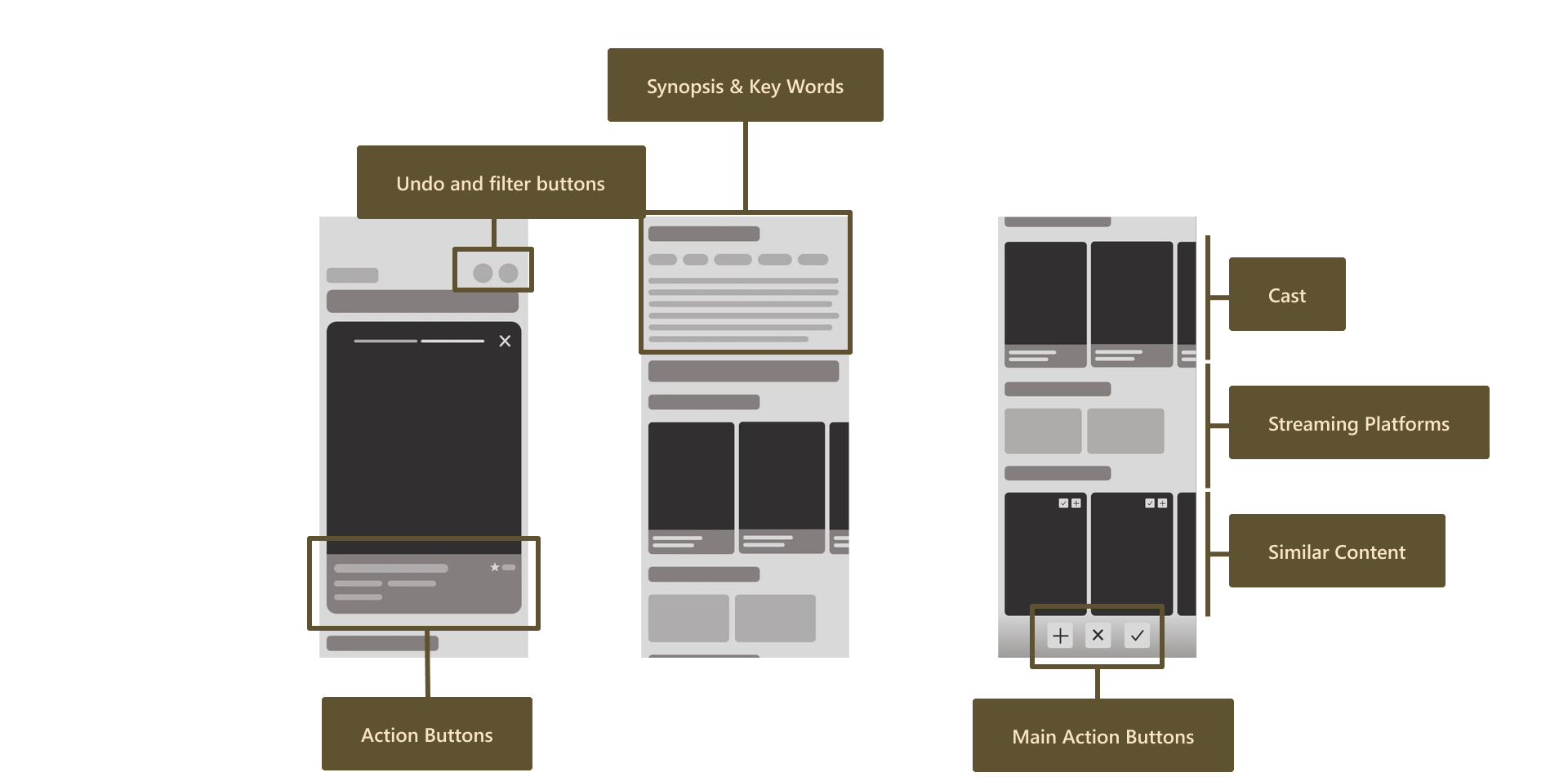
Wireframes of the feature: the card with undo and filter buttons at the top and action buttons at the bottom, then the scrolling section with the synopsis and key words, cast, streaming platforms, similar content, and main action buttons fixed at the bottom.Wireframes de la fonctionnalité : la carte avec les boutons Retour et Filtre en haut et les boutons d’action en bas, puis la section défilante avec le synopsis et les mots-clés, le casting, les plateformes de diffusion, le contenu similaire et les boutons d’action principaux fixés en bas.

Research is important (especially as beginner)La recherche compte (surtout en début de carrière)

Back then, I reflected mainly on the fact of better documenting my research and conducting research from the very beginning. My lack of organization had me go back several time to see different applications and their interface, and made me create a lot of wireframes without knowing what I was doing.

À l’époque, j’avais surtout retenu qu’il fallait mieux documenter mes recherches et les mener dès le début du projet. Mon manque d’organisation m’avait fait revenir plusieurs fois sur différentes applications et interfaces, et créer beaucoup de wireframes sans vraiment savoir où j’allais.

Perfect is the enemy of done!Le mieux est l’ennemi du bien !

After iterating again and again on details, I was totally discouraged. It was my first time having to accept that there is not only one possible and viable way to design this feature and that seeking perfection was counterproductive.

À force d’itérer sans fin sur des détails, j’étais totalement découragée. C’était la première fois que je devais accepter qu’il n’existe pas une seule façon viable de concevoir cette fonctionnalité, et que chercher la perfection était contre-productif.

Would I change the same things?Changerais-je les mêmes choses ?

No, there are a lot of things I would do differently now that I have more experience: Information on tap is definitely the best behavior, to help with loading time and prevent wrong actions. Keep 2 main actions: pass and seen, but pass watchlist both on the card and at the top of the information after the card is tapped. Trailer at the top of the information too, so that users are provided with the best information! Overall, I remember putting a lot of efforts researching the best behaviors and layouts for this. Now, I know that it is all about what works for the users and that it is rarely perfect. Since 2024, Queue has reworked this feature and has implemented information on tap.

Non, il y a beaucoup de choses que je ferais différemment avec plus d’expérience : l’information au tap reste clairement le meilleur choix, pour le temps de chargement et pour éviter les erreurs. Garder 2 actions principales : pass et vu, mais proposer la watchlist à la fois sur la carte et en haut de l’information une fois la carte tappée. La bande-annonce également en haut de l’information, pour offrir la meilleure information en premier ! Globalement, je me souviens avoir beaucoup travaillé pour trouver les meilleurs comportements et mises en page. Aujourd’hui, je sais que tout est question de ce qui fonctionne pour les utilisateurs, et que c’est rarement parfait. Depuis 2024, Queue a retravaillé cette fonctionnalité et a implémenté l’information au tap.

Back to the topRetour en haut

Other projectsAutres projets